
How to Observe in Halo Infinite
Tips on how to be a great tournament observer, backed by knowledge from the pros.
 Written by Okom on Jul 26, 2026 in Halo. Last edited: Jul 26, 2026.
Article summary
- Observing is watching POVs of players playing in a tournament, and having that POV shown to a live audience.
- Observers have to adjust multiple settings to ensure their game looks standardized for showcasing on a broadcast.
- Observing requires a sharp eye, understanding the game, and being a good listener. The observer must be able to react to the gameplay as well as recognize when the casters are telling a story about the ongoing game.
- I reached out to professional observers and casters to get their input about the skills of a great observer.
- I figured out how to observe 12v12 gameplay, but even the best way was not ideal.
Tournament observers are often taken for granted and their work may seem simple on the surface, but there's a lot more to it than just switching to the right player at the right time. In this article, I'll explore what observing is and how to be great at it on Halo Infinite, backed with knowledge from professional observers and casters.
What is observing
The act of observing is being an observer of a match; the person, whose view the audience and the casters watch to see as much of the action happening in the match as possible and understand how the game is going. The observer view often is a first-person point of view (POV) of a player with stats of the game displayed most of the time so the audience can see the great plays being made, and understands the progression of the game.
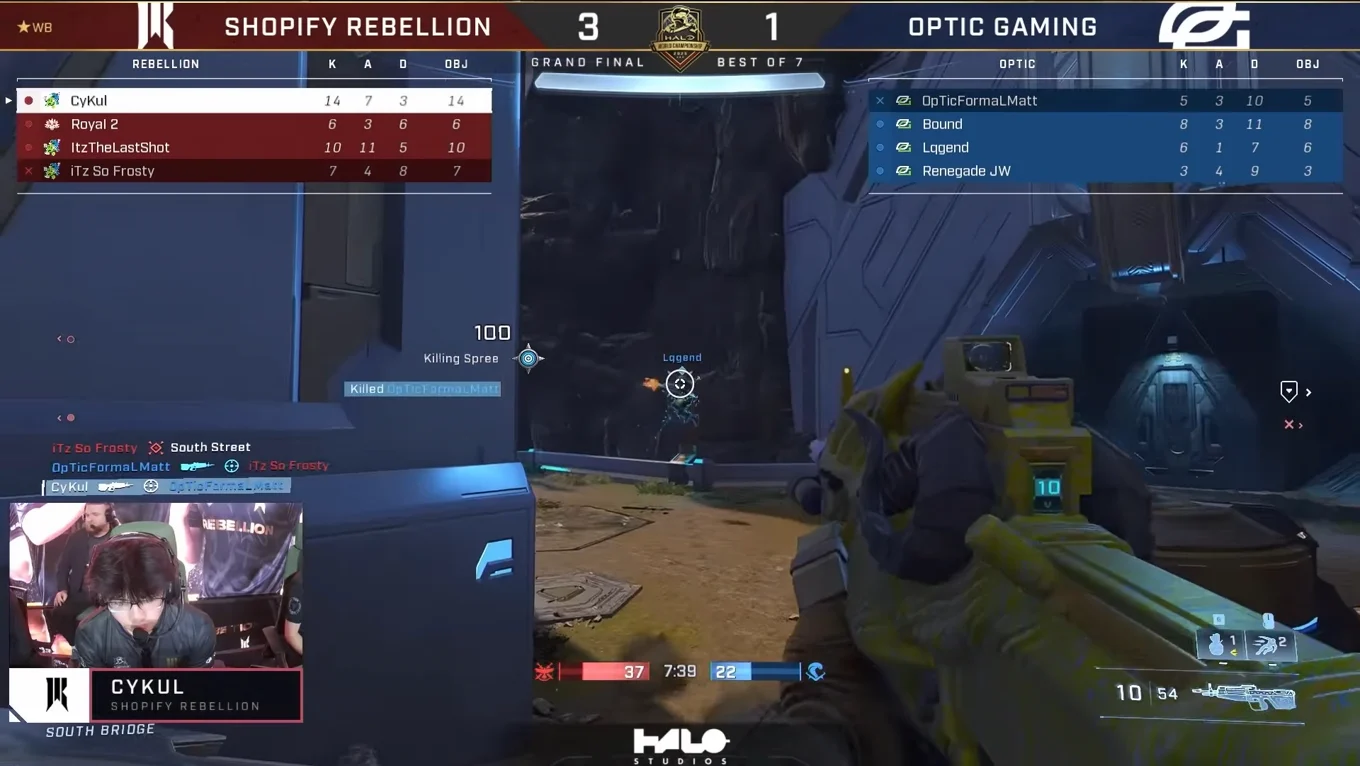
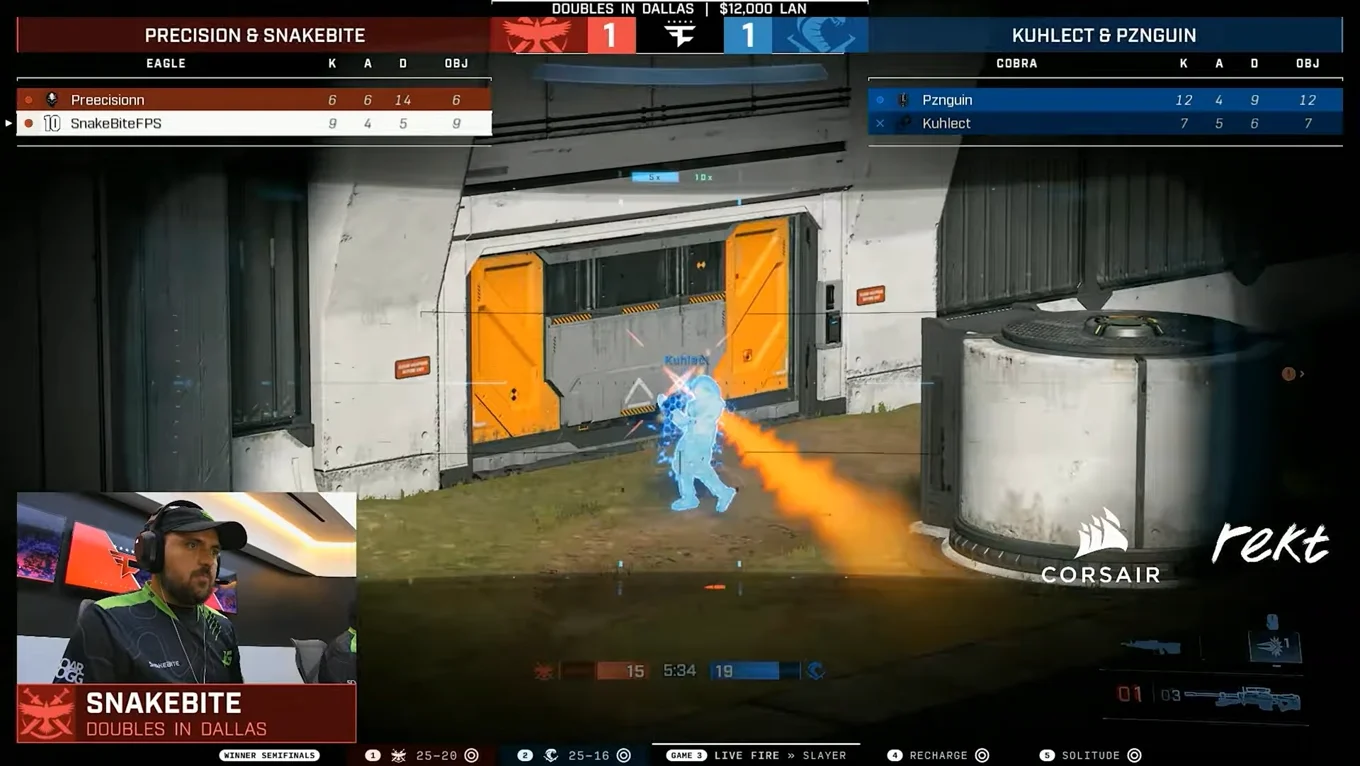
Part of all the greatest Halo highlights you can think of has been an observer who knew how to catch those moments at the right time. When the setup to a great moment is captured by the observer and backed up by a story being told by the casters, it feels just as good for the observer as it does for the audience.
How to be a great observer
Observer settings
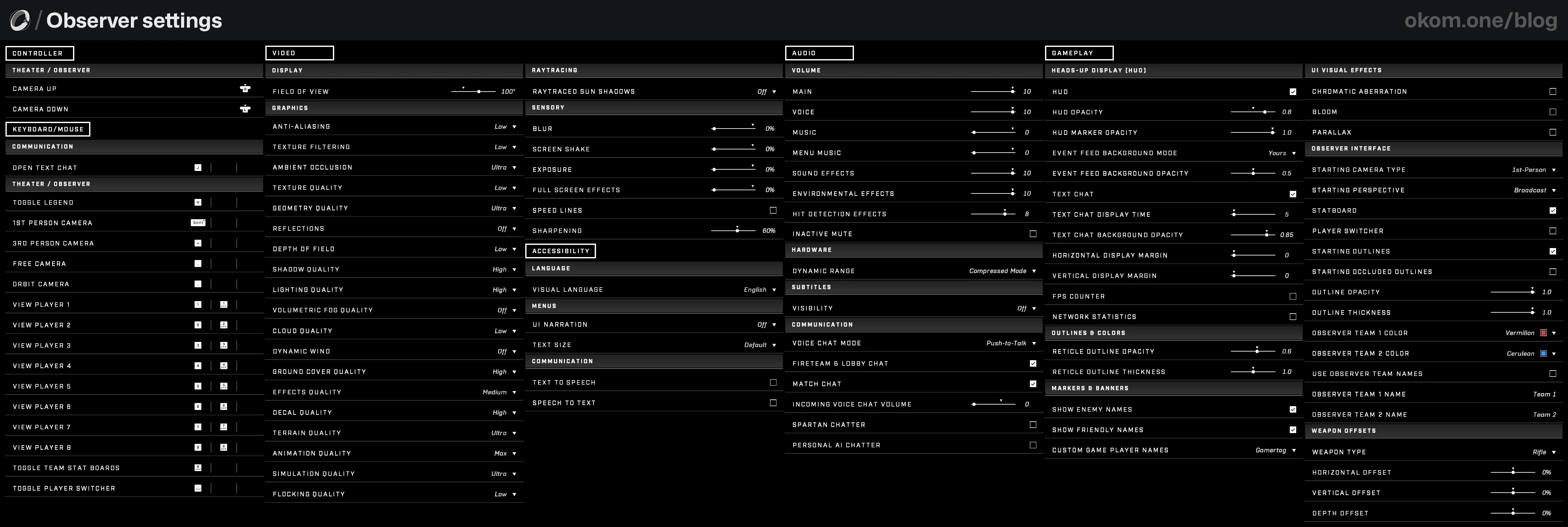
The settings for an observer's POV have to be optimized to represent a neutral and standardized view with as little personalized features as possible. Luckily these settings can be reversed easily if you're just observing for one weekend and then want to keep playing the game with your personalized settings after.
Settings breakdown
Controller
- Theater / Observer
- (Optional) Adjust the camera movement controls to your liking for smooth free cam shots if you have a controller available. Normally free cam shots aren't required when observing, but they can be utilized in larger productions with two observers and temporary free cam shots.
Keyboard / Mouse
- Communication
- Open Text Chat: You'll want to be able to talk to the players via text chat if needed.
- Theater / Observer
- Toggle Legend: This key must be pressed once at the start of the match to remove the control bar at the bottom.
- (Optional) 1st Person Camera: For switching immediately to the 1st-person camera. Most observer shots are in 1st-person, so if for some reason the camera switches away from it, this key can be pressed to immediately return to the right camera as long as the player is alive.
- (Optional) 3rd Person Camera, Free Camera & Orbit Camera: For switching immediately to the other camera types. When observing modes with vehicles or more than 8 players, it's useful to be able to switch to a specific camera type if the 1st-person camera can't capture all the desired action.
- View Player 1–8: The most important keys; used for switching to specific player POVs. The order of the players is top-down with 1–4 being for the left team and 5–8 for the right team. In advanced productions these keys can also be mapped to specific scenes in screen capture software to correspond to custom overlays like player names and webcams changing when the POV is changed.
- (Optional) Toggle Team Stat Boards: For toggling the scoreboard. In modes with more than 12 players, the scoreboard starts taking up so much space that it's often better to have it hidden. The scoreboard can also be hidden during free cam shots for a cleaner viewing experience.
The scoreboard covering half the screen with 24 players, from the Swat Nation 2023 BTB Bonanza Tournament - Toggle Player Switcher: For toggling the player's name box at the top middle. This can interfere with broadcast graphic placements, but can also help casters in quickly seeing who the observed player is (casters see the raw POV without graphics). Should be toggled off for free cam shots. The "Player Switcher" setting under "Gameplay" controls whether this is visible by default.
Video
- Display
- Field of View: 100°. A standard FOV for observing that doesn't look stretched or zoomed. For free cam shots, use 80° (only if separate observer for free cam).
- Graphics
- I recommend following XLR8's OVERDRIVE Performance Tutorial with a few tweaks to make the game look better with negligible performance impact. I use these settings for gameplay, observing, forge screenshots, and map trailer footage.
- Ambient Occlusion: Ultra. More accurate shadows in corners, under objects, around foliage, and between small details.
- Geometry Quality: Ultra. Doesn't compromise on the level of detail in the geometry shapes on the level or with player models. Reduces distant object pop-in. Better for retaining Forge map detail.
- Shadow Quality: High. Makes shadow shapes more accurate. Forge maps look like how forger intended.
- Lighting Quality: Hight. Makes lighting more accurate. Forge maps look like how the forger intended.
- Ground Cover Quality: High. Prevents distant trees from disappearing when the player is moving.
- Terrain Quality: Ultra. Eliminates terrain quality changing at short distances. Noticeable when observing angles that show terrain for a long distance.
- Flocking Quality: Low. Enables critter FX that the map creators intended to be shown.
- Raytracing
- Raytraced Sun Shadows: Off. Performs worse with long-distance shadows than normal lighting settings, and majorly impacts performance.
- Sensory
- Blur, Screen Shake, Exposure, Full Screen Effects: 0%. Distracting for the observer experience.
- Speed Lines: Off. Distracting for the observer experience.
- (Optional) Sharpening: 60%. A good middle ground for making the game look crisper with no performance cost.
- Screen Calibration (Press R/[Y] while in Video tab)
- Brightness: 0
Audio
- Volume
- Main: 10. You want to provide the max volume from your game so the production can adjust it down if necessary.
- Voice: 10. Includes voice lines like "Ball dropped", which are necessary. Note, that medals like "Triple Kill" awarded to players aren't audible in the observer view.
- Music: 0
- Menu Music: 0
- Sound Effects: 10
- Environmental Effects: 10
- Hit Detection Effects: 8
- Inactive Mute: Off. We don't want the game to mute if the observer has to un-focus the game for some reason.
- Hardware
- Dynamic Range: Compressed Mode. Allows the Bandit sound to hit harder, and makes a more predictable audio stream from the observer as the sounds are more compressed and equal to one another.
- Subtitles
- Visibility: Off
- Communication
- Voice Chat Mode: Push-to-Talk. You don't want to accidentally talk in the mic in-game when you don't intend to.
- Fireteam & Lobby Chat, Match Chat: On. You must be able to communicate with the players in the lobby if needed.
- Incoming Voice Chat Volume: 0. You don't want to hear players' voices in the lobby as it can disrupt the broadcast.
- Spartan Chatter, Personal AI Chatter: Off. We don't want to hear unnecessary in-game voices when observing.
Gameplay
- Heads-Up Display (HUD)
- HUD: On
- HUD Opacity: 0.8. Max 1.0 is a bit too bright.
- HUD Marker Opacity: 1.0
- Event Feed Background Mode: Yours. Highlights the kills in the kill feed the player you're observing gets.
- Event Feed Background Opacity: 0.5
- Text Chat: On. You must be able to communicate with the players in the lobby if needed.
- Text Chat Display Time: 5. We want to see the text chat, but for as little as possible.
- Text Chat Background Opacity: 0.85
- Horizontal Display Margin: 0
- Vertical Display Margin: 0
- FPS Counter, Network Statistics: Off. We don't want to show these at the top right of the observer view.
- Outlines & Colors
- Reticle Outline Opacity: 0.6
- Reticle Outline Thickness: 1.0
- Markers & Banners
- Show Enemy Names: On
- Show Friendly Names: On
- Custom Game Player Names: Gamertag
- UI Visual Effects
- Chromatic Aberration, Bloom, Parallax: Off
- Observer Interface
- Starting Camera Type: 1st-Person
- Starting Perspective: Broadcast. Important; uses the observer team colors instead of enemy UI colors.
- Statboard: On
- Player Switcher: On/Off. Depending on the observing setup. On if it's needed at the start. This is the player name box in the top middle.
- Starting Outlines: On
- Starting Occluded Outlines: Off
- Outline Opacity: 1.0
- Outline Thickness: 1.0
- Observer Team 1 Color: Vermillion. In very advanced productions this would be changed per game to match the team's associated color.
- Observer Team 2 Color: Cerulean. In very advanced productions this would be changed per game to match the team's associated color.
- Use Observer Team Names: On/Off. Enable in advanced productions for manually changing what the displayed team names are above the player stats in the observer view. Defaults are Eagle and Cobra.
- Observer Team 1/2 Name: Update if needed. Note the 2–16-character limit and Xbox Live Code of Conduct text filters affecting what can be written.
- Weapon Offsets
- Horizontal Offset: 0% (for all weapon types)
- Vertical Offset: 0% (for all weapon types)
- Depth Offset: 0% (for all weapon types)
Accessibility
- Language
- Visual Language: English/Production preference
- Menus
- UI Narration: Off
- Text Size: Default
- Communication
- Text to Speech, Speech to Text: Off
Observer skills
Once the settings have been dialed in, the observing process can begin. Admittedly there is a lot of pressure on the observer to catch all the best moments and keep the audience engaged in the viewing experience as much as they can. A great observer has a sharp eye, understands the game, and is a good listener—all of which are required for a seamless observing experience.
Pre-game
Not every game in a tournament requires an observer, but when a game wants to be shown on the broadcast, at least one observer needs to be in the lobby with the players. Before the match begins, the observer must do some setup:
- Join the lobby: In online games ask for- or send an Xbox or Discord invite to the lobby, or even use waypoint.gg's lobby widget (paid). In LAN games join the correct LAN session.
- Switch to the Observer team: Press the hotkeys displayed at the bottom or the icon next to your name in the lobby to switch to the green Observer team. Optionally the lobby host can switch your team.
- Update the team names and colors: If agreed with production, update the team names and colors in the settings Gameplay → Observer Interface.
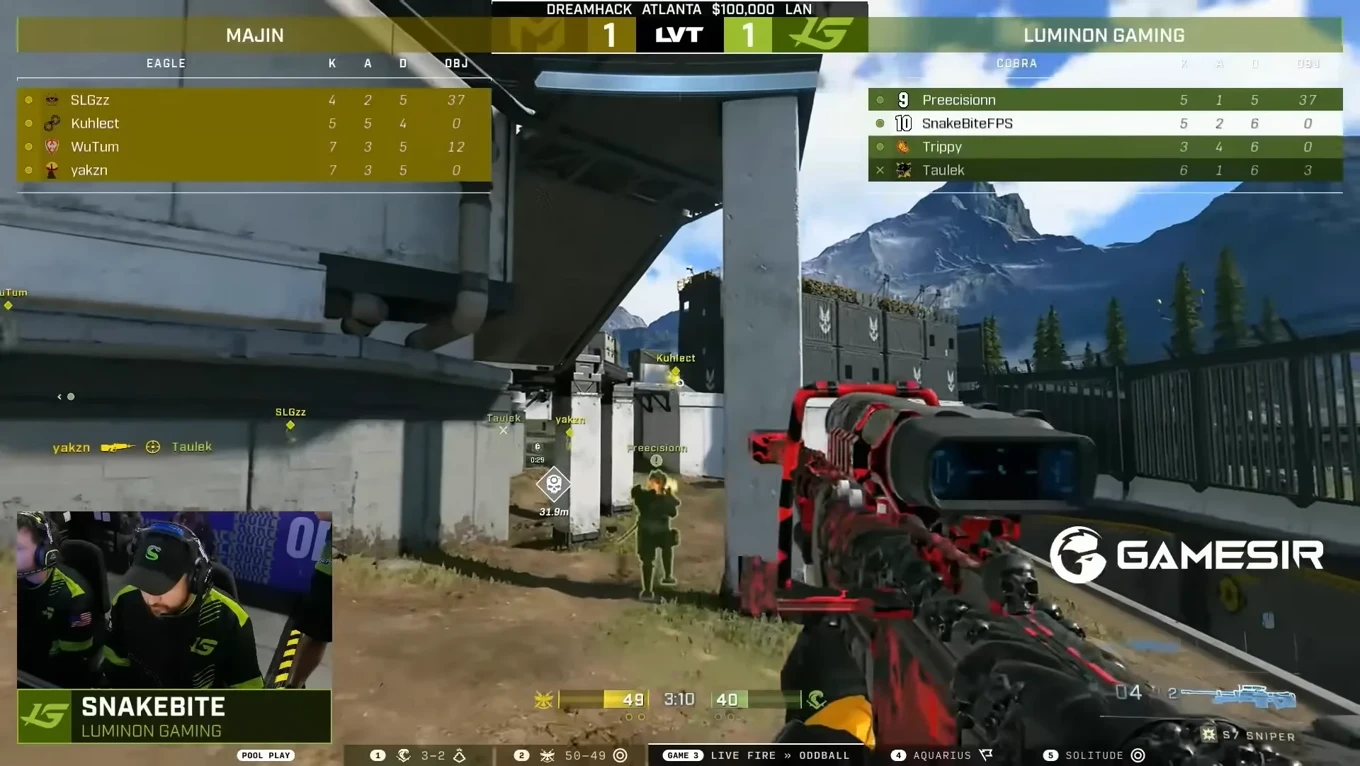
Example of a production with adjusted team colors - Set up the map and mode: If you're the host of the lobby, set up the correct map and mode that are to be played next. In smaller productions the host may be one of the players, but ideally the lobby control would be on the observer to allow less room for mistakes.
- Set the lobby privacy and max size: The lobby privacy should be "Friends Only" and the max size just enough to accommodate all the players and the desired number of observers (9 for a 4v4 with one observer). This is a precautionary step to ensure the lobby can be rejoined in the event of a disconnect, but not allowing joining the lobby otherwise as it's normally full. If the lobby privacy is set to "Invite Only", getting back in the lobby after a disconnect is a larger hassle. More in Potential issues. Note, that a lobby with "Friends Only" privacy can still be joined via an invite.
- Confirm the players are ready: Ask "r?" or "Ready?" in the text chat from the players and await a response. Usually, one player per team communicates back with "r" once their team is ready. If a player switches to the observer team at any point, it means they're not ready.
- Start the match: Once both teams are ready, and you've confirmed production is also ready to begin, start the match.
On gameplay start
Some actions must be done at the very beginning of the match right as you gain control over the observing interface.
- Hide Legend bar: Hide the control bar at the bottom of the screen by pressing the key assigned to Toggle Legend in Keyboard / Mouse → Theater / Observer. Do this immediately so production can switch to your POV as fast as possible and not miss the opening of the game.
Example of toggling the Legend on gameplay start - (Optional) Switch player POV: If the casters are building a story about a specific player in the moment—like about their opening strategy—, it's good to switch to that player so the story has a matching visual portion.
During the match
The bulk of the observing work happens during gameplay, and shows how knowledgeable the observer is.
- Know the controls: Know which keys to press to switch to player POVs consistently. The number keys 1-8 are assigned to each player in an 8-player match with 1–4 being for the left team and 5–8 for the right team. Have your fingers ready on these keys to switch to specific POVs at a moment's notice.
- Catch the action: Prioritize players who are holding power items, or making impactful moments like a multi-kill or securing an objective. Try to catch more kill POVs than death POVs. Recognize and showcase when teams are setting up a play. Nearing the end of the game, prioritize players who are on the winning team and who may make the last play of the match.
Showcasing the flag cap Switching to the player who may get the last kill - Understand and keep the flow: If the observed player dies, switch to the player who killed them, or a nearby teammate, if it suits the scenario and story better. Don't switch the POV too fast, as this confuses the viewer. If a funny or impactful death or a highly anticipated multi-kill happens, stay on the POV for a bit longer—even if the player is dead—to emphasize the impact of the moment instead of switching away from it. This lets the audience take in the moment before focusing on the next one.
Staying on death screen for dramatic effect Missing the start of a multi-kill, but catching the end - Listen to the casters: Pay attention to when casters are telling a story about a player or a play happening in the game, and help that story with the chosen player POV if possible.
Post-game
After the game has ended, the observer still has some work to do to ensure the broadcast and next game will continue smoothly.
- Show the scoreboard: After the game ends and you're shown a screen with the winning team, press E to switch to the scoreboard. Show the kills first and then move on to accuracy and damage. If the casters are talking about a specific player, highlight their name. You can also highlight a player's name if the casters aren't seeing something you are, like a high assist count.
Showcasing the scoreboard after the match - Set up the next game: If you're the host, set up the next map and mode when the production view is not on your screen anymore; you don't want the broadcast to see the lobby screen as it breaks the flow of the viewing experience. Unless a player goes to the observer team to indicate they're not ready, you can start the next match right after the map and mode have been updated. You also need to pay attention to who won the previous match to determine whether the series is over or should still continue. You don't want to confuse the production team by starting a third match if one team won the first two games in a best-of-three series.
Potential issues
Here are some issues the observer should be aware of that impact the observing experience, and how to address them.
- Player disconnects during game: Note down the current score, rounds won, and elapsed time of the match either via text or screenshot and end the match. In the lobby screen, edit the mode settings to adjust the starting score and rounds won of both teams, and the elapsed time to match what they were at the moment of disconnect. Find the settings at: Mode Editor → Match → Match Setup Overrides.
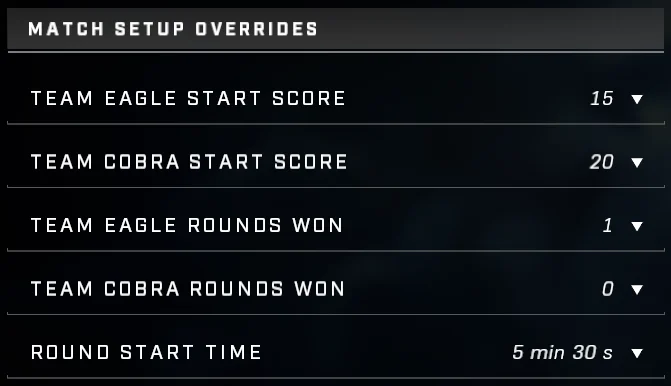
Match setup override settings - Observer disconnects during game: Rejoin the lobby as quick as possible to minimize broadcast downtime. If the lobby was set to "Friends Only" privacy, you can rejoin on a friend who is still in the lobby, but if the game is "Invite Only", one of the players will have to invite you, which is more unlikely.
- Observer has to join in progress to an ongoing game: If an observer joins in progress to a game, the score at the bottom of the screen won't display for the duration of that game. This is a game bug and can't be fixed by the observer.
Knowledge from the pros
I reached out to experienced Halo Infinite observers and casters to confirm the info I was going to write about in this article was solid, as well as to get their personal opinions on some questions regarding observing tournament gameplay. There are some great subtle details in the answers that can really help you understand the skills required to be a great observer.
eL ToWn
- What do you pay attention to most when observing? The power weapon player, camo or OS player, someone who is on a spree (show the killing spree or riot etc.). If none of the previous are in play, someone making a flank or sneaky play, or a player about to capture the flag.
- What's the most difficult part about observing? Not being able to see all player POVs at once. Sometimes you'll miss stuff 'cause you don't actually know who picked up a sniper or camo if there's a mosh pit for it. 2nd observer helps this problem.
- How do you determine when to switch to a player POV? Usually, death, or if something important is about to happen—like a flag cap or triple kill—or if the player is clearly far away from the action.
- How does observing amateur players differ from observing professionals, and which is more difficult? Not too different, same concept and ideology apply. AMs just might not be as organized or faster pace, and are more chaotic, leading to figuring out who to switch to more difficult.
- Do you have any tips to other observers that took a while to recognize and learn? Practice and getting reps are honestly the only way to get better. Another tip would be to try to help the casters tell a story. Sometimes they will talk about a certain player either before the game starts or during. So, if they are talking about a player before, you can show their starting strat. Or if they talk about how a player is having a slow start and hoping they can turn it around, switch to that player so the story and viewer perspective is better.
Callous
- What do you pay attention to most when observing? The most important thing to me is telling a story. I try to focus on the game state and what the casters are saying to catch a ton of action while weaving a story for each game.
- What's the most difficult part about observing? Consistently finding the "right" action. It's easy to make too little or too many switches at the wrong times. Also, shoutout to Halo Infinite for COMPLETELY ERASING THE SCOREBOARD when you make a POV switch. Good luck trying to catch that overkill when what looks like the "1st kill" is actually the triple kill in the sequence.
- How do you determine when to switch to a player POV? I study a ton of film using Infinite's theater mode to understand the meta being used by pro teams. Knowing the meta has been key to understanding the game state and how to recognize when a huge play is being developed. Not knowing the meta means you're just stuck looking for who has a power weapon or power-up, or who might get a multi-kill.
- How does observing amateur players differ from observing professionals, and which is more difficult? The biggest difference for me is the speed of play. AM teams might make the right play, but they are taking much longer to do it, making it much easier to observe and catch all the action. Pro teams have their Nikes on at all times and almost always make the correct plays.
- Do you have any tips to other observers that took a while to recognize and learn? Nothing takes a viewer out of the story faster than constantly switching the POV to completely different parts of the map. Follow the camera. Treat your Observer POV as another player on the map. When the POV dies, can you switch to someone within that frame to keep "following the camera"? Also, HAVE FUN! You won't always catch the right plays, you're going to miss things, you will accidentally hit the wrong key at some point—and that SUCKS... but it's OKAY. Learn from it and move on to the next play.
Meg
- What do you pay attention to most when observing? What is happening off-screen, as that influences who I would be switching to next. An example of that would be, say, I see someone is playing an objective, or if a power weapon comes up.
- What's the most difficult part about observing? Being able to keep track of everything going on. In 2s it is much easier as the fight happens on the same part of a map. In 4s it gets more challenging as there are multiple fights happening at the same time, and I need to choose what fight to show.
- How do you determine when to switch to a player POV? If someone has a power weapon I show them; if someone has camo I show them. That makes my job quite easy. When neither are in play, I try to show as much action as possible. If there is a lull, I look for a player who is going to set up the next round of fights. If I can see someone going for a flank, I try to switch to them right before they enter the fight.
- How does observing amateur players differ from observing professionals, and which is more difficult? The biggest difference is that the pros are making the correct and clean plays, and there is a flow to them that makes observing them a breeze. You never know what you are going to get with amateurs and it's always fun to try to figure out what they are trying to do, and sometimes they don't know what they are doing and it gets to be quite amusing. 😆
- Do you have any tips to other observers that took a while to recognize and learn? The biggest tip I have is to always keep tabs on power-ups, as that will always dictate what the fight is going to look like. Watch back VODs of broadcasts and put yourself in the shoes of the observer, and think why they would be on that certain player's perspective. The more you observe, the better you get, so practice makes perfect!
Legendary C4
- What do you pay attention to most when observing? I usually just pay attention to the plays that are developing on screen and the timing of pushes, and try to catch the player who is positioned to get a kill. Mostly I watch for who has what power weapons or equipment. I watch for flanks, sneaky plays, and where the other players are positioned relative to their teammates. I also listen to what the casters are saying and that sometimes dictates what screen I switch to because that's an extra set of eyes on something I might have missed myself.
- What's the most difficult part about observing? Probably paying attention to where everyone is on the map at any given time. The hardest part sometimes can be knowing what player is about to pop off, so if you aren't paying attention, you can miss a vital play.
- How do you determine when to switch to a player POV? I usually try to be on the POV of the player who has control of power items, or in a great or sneaky position to make plays. I also make sure to switch off a player if there hasn't been any action for a considerable amount of time. Sometimes listening to the casters or watching the kill feed can help you determine when to switch as well.
- How does observing amateur players differ from observing professionals, and which is more difficult? Pros are a bit faster to make plays and are more aggressive. I wouldn't say it's more difficult either way. AM players can be just a bit slower to recognize plays in the moment, but overall it's the same concept with pros.
- Do you have any tips to other observers that took a while to recognize and learn? Stick to one POV for a while and see what happens. If there's not much going on, then make a switch, but just pay attention to power items and who is grabbing them, and switch to that player.
Also playing high-level Halo helps a lot, and watching tons of HCS and grassroots tournaments has gone a long way toward helping me be a good observer. I have watched countless hours of tournament gameplay for fun and over time that translates into being a good observer, because as a viewer you know what you want to see. For extra practice you can also review film to help further your observing skills.
SherzyOne
- What do you appreciate in a good observer that makes your job easier? Outside of the obvious like following power weapons and power-ups, I find it can be really helpful for storytelling if you're listening to casters, and when they highlight a particular player, switching to that POV whilst they make a point can be good. For things like guaranteed flag caps, you don't need to follow the flag runner the entire time, but switching to them as they put the flag in so casters can inform the audience with visual confirmation is nice. For anything else you should trust your gut and ask for feedback; you and the casters are a team.
Eli The NiNjA
- What do you appreciate in a good observer that makes your job easier? As a caster, it's helpful for the observer to notice what I'm talking about and try to highlight the player in question. Like, if I notice someone grabs camo or snipe and mention it, switch to their POV. Or if someone is setting up a flank behind the enemy team. But imo what makes Callous (LVT observer) such a good observer is he also has a lot of game knowledge (he's roughly 1700 Onyx), so he is often switching to the right person before I even have to say anything. It's a skill you have to develop either through watching a lot of high-level gameplay or having a lot of in-game experience yourself.
The other tip is to try to avoid switching POVs too frequently as it can get confusing for the viewer. Callous will also scroll through the post-game stats and intentionally highlight any stats that stand out to him as a cue to mention it on the cast. But a good caster should pick those things. It just helps to have that guiding hand if we are yapping about something else lol.
Shyway
- What do you appreciate in a good observer that makes your job easier? I don't have too many specific preferences—colors associated with team branding are nice. I think just making sure you're keeping track of the players with the weapons/resources and listening closely to the casters if the conversation is focused around a specific player. The more you observe and understand the flow of the game/who's the priority player in a given scenario, the easier I think it'll be to choose the right POV for the right moment.
How I prepared for observing
Observing 12v12
Before observing for real, I had some prior experience with observing just for the fun of it. Having been a forger in Halo Infinite since its launch, I was very familiar with lobby management, and also somewhat familiar with the observer role from trying it out in some forge testing lobbies and TSG Warzone playdates. TSG Warzone is a 12v12 PvPvE mode, which is like the final boss of observing, so I thought if I figured out how to observe that, I'd be set for smaller tasks down the line.
For observing 12v12, you can't just use the number keys 1–8 to switch POVs cause there's more than 8 players. The on-screen scoreboard also takes up half of the screen with 24 players displayed that it must be hidden most of the time. In order to switch to a desired player when observing 12v12, you need to temporarily show the scoreboard, navigate to the player with arrow keys or the D-pad, select the player and hide the scoreboard. This is the most seamless way I figured it would be. The other option is to use the "Next Player" and "Previous Player" buttons, but at that point you're just guessing who you're going to switch to next as for some reason the order in which player it switches to doesn't follow the scoreboard order.
Since 12v12 has so many players roaming around, it's also quite difficult to catch the action or get an idea of when larger plays are being formed. An overhead view can help with this by giving the audience a general idea of the plays being made instead of individual POVs. An ideal 12v12 production would have at least two observers: one watching only first person POVs and one only doing free cam shots.
Preparing for real observing
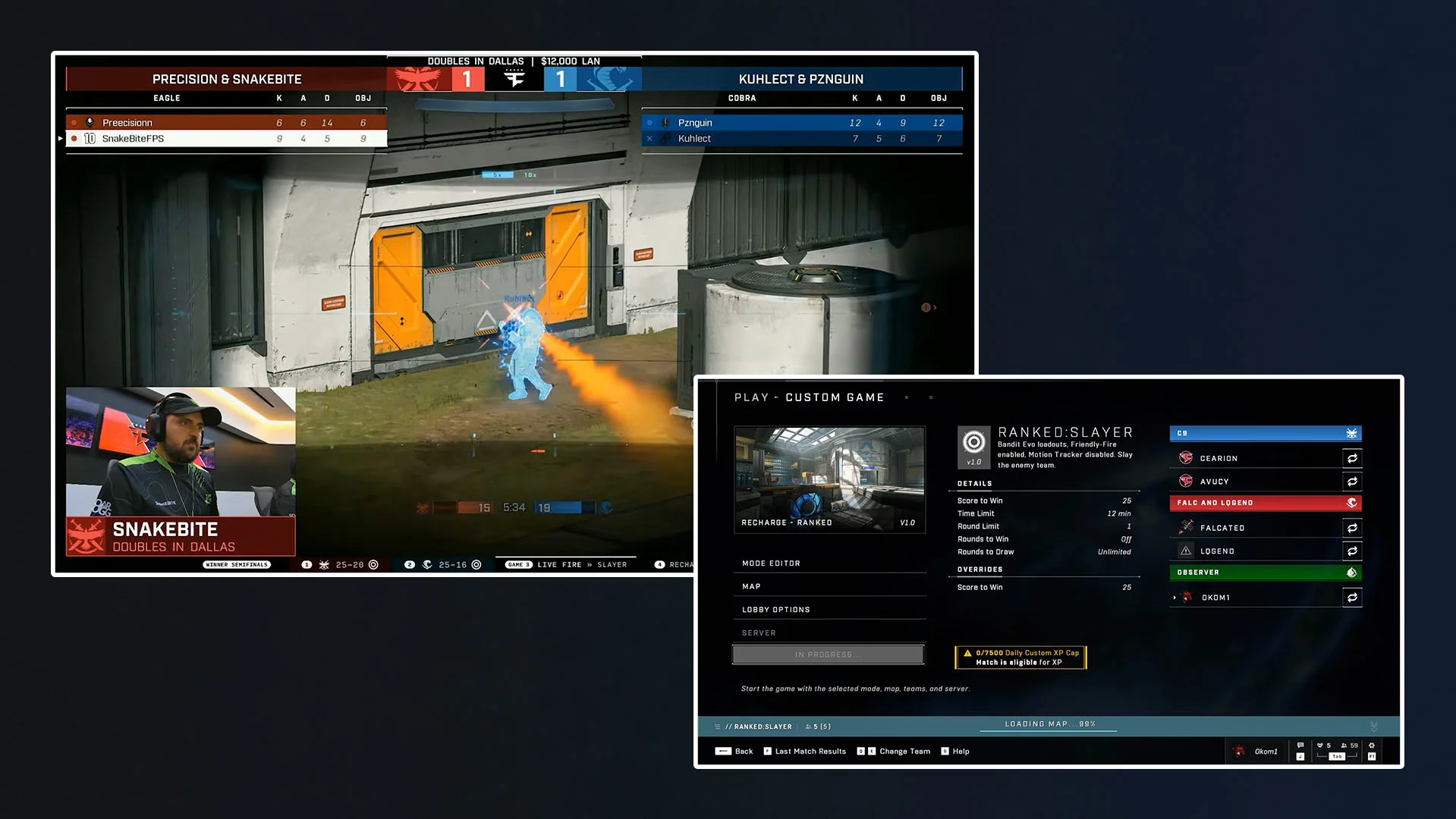
My first production observing experience was in the Luminon x Shyway Double Down Duos Tournament held on 2026-07-18 where I was one of two observers who were observing separate games. While I had some practice with observing beforehand, I still had to do more research into it so I'd be confident in performing well during the tournament.
Since I had already practiced the observer controls, I just had to recognize the core observing principles for what to do during the pre-game, gameplay and post-game. I closely watched portions of the FaZe Esports Doubles in Dallas tournament and the HCS 2025 World Championship Grand Finals because the 2v2 format was relevant to what I was going to be observing, and they were both the latest showcase of professional observing.
From my research I picked out these key points that I had to keep in mind in addition to the knowledge I already had:
- Prioritize players with power items
- Don't switch between POVs too fast, even if an accidental switch because it shows that you did an accident
- If game is about to end, focus on winning team POVs and don't switch the POV
- Confirm the FOV and weapon offsets
Four months prior, I was looking into how to observe 12v12 for a potential TSG Warzone tournament, and had the chance to ask LVT about some experiences with observing a complex situation like that. Louis from LVT stated that they had gotten requests to observe and produce Halo Infinite content with large player counts, but had declined due to it being impossible to catch all the action and observe cleanly.
Broadcast resources
Here's some resources I compiled that can help with broadcast graphics if you're planning on a production of your own and want to nail down the basics.
Team icons
Transparent images of the Halo Infinite teams 1–8 + Observer.


Mode icons
Includes all modes that are played competitively, and then some.


Team colors
All selectable team colors in Halo Infinite with their HEX code and color representation. Useful for matching the color palette of a participating team if the observer needs to change the team colors.
















Buttons and keys
Not sure where these would be useful, but here you go.